The 3 Best John Deere Code Readers (2026 Update)
If you’re looking for a code reader to diagnose and repair problems with your John Deere machinery, then you have come to the right place. There are many different models of John Deere code readers on the market, but we have narrowed it down to three of the best: Jaltest, Nexlink NL102 and FCAR 507.
In this article, we will discuss each John Deere code readers’ features, benefits, and compare them so that you can make an informed decision about which one is best for your needs. We will also provide tips on how to use and maintain each code reader in order to ensure optimal performance over time. Let's get started.
Jaltest: The #1 Best John Deere Code Reader
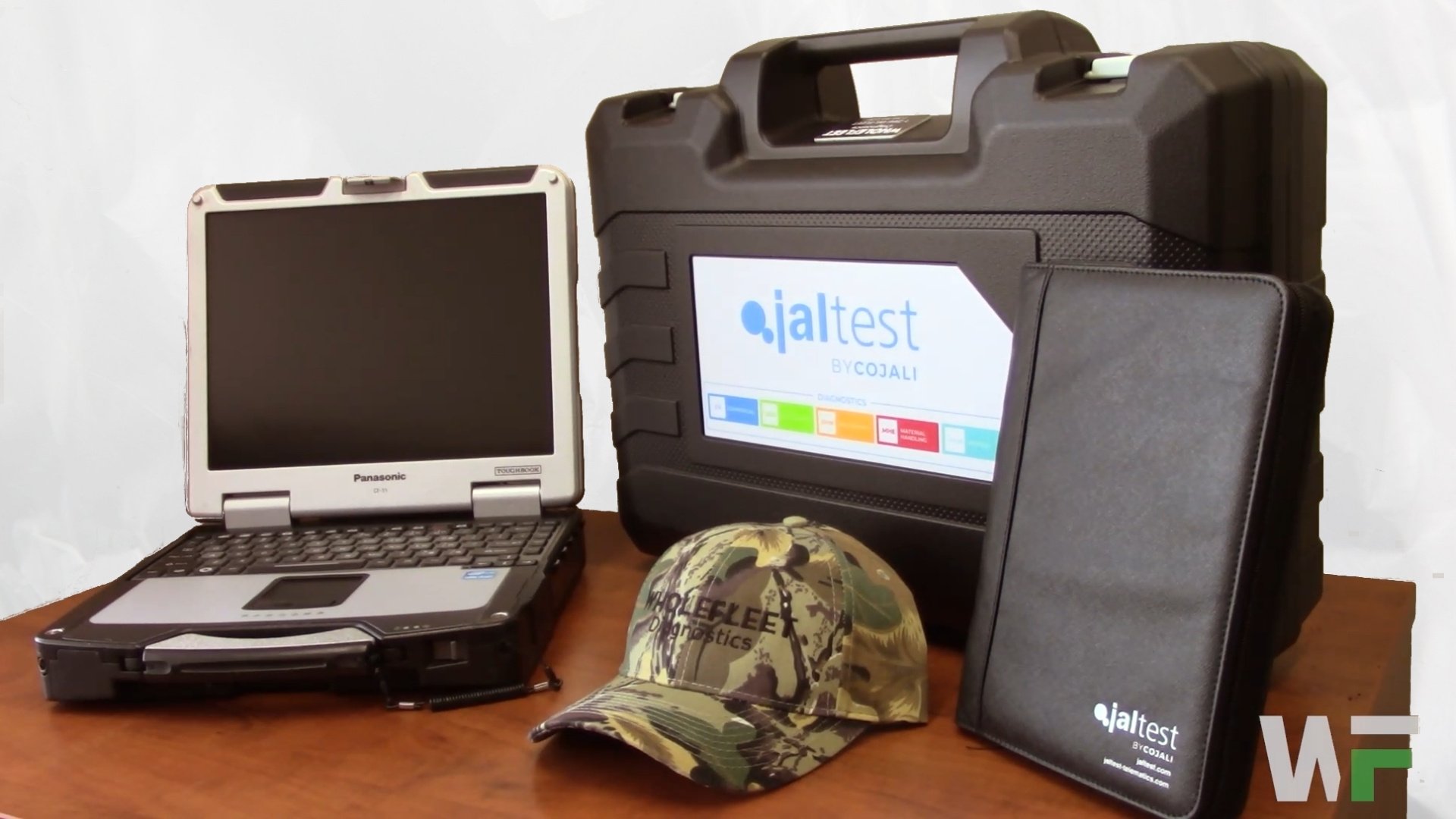
Jaltest provides comprehensive diagnostic capabilities for a wide range of agricultural vehicles such as tractors, combines, and sprayers.
Jaltest is one of the best John Deere code readers on the market. It is top-of-the-line diagnostic software with a specific market for agricultural vehicles like John Deere. The agricultural vehicle version of Jaltest is known as Jaltest AGV.
Nothing is left off the table when you use Jaltest AGV. You'll be able to run a full system scan that tells you exactly what is wrong with your vehicle, with troubleshooting guides and wiring diagrams that demonstrate how to fix the issue. Plus, the system enables seamless data monitoring from John Deere machines like tractors, combines and sprayers, allowing you to understand changes in vehicle performance over time. Jaltest AGV is known for being user-friendly and comes with a detailed instruction manual so that you don’t get lost while using it.
Pros & Cons of Jaltest AGV for John Deere Code Reading (2026 Update)
Pros
Comprehensive diagnostics: Performs full-system scans and identifies fault codes across multiple vehicle systems.
Wide equipment coverage: Supports many types of agricultural machinery, including tractors, combines, and sprayers from John Deere and other manufacturers.
Detailed technical information: Provides repair guides, wiring diagrams, and troubleshooting procedures.
Live data monitoring: Allows technicians to view real-time machine performance and sensor data.
User-friendly interface: Designed to be accessible for both experienced technicians and newer users. It should be easy to use for someone who owns a farm but isn’t technically proficient.
Frequent Updates: Jaltest updates at least 3 times per year, which allows them to scan and support newly-released models of John Deere. Additionally, updates often introduce new features to streamline troubleshooting.
Cons
Higher cost: Jaltest can be expensive compared to basic code readers or entry-level diagnostic tools. That said, the advanced wiring diagrams, live data monitoring capabilities, and repair guides aren’t something you’ll find in standard, low-cost scanners.
Subscription required: Jaltest runs on a annual subscription-based pricing model. Most features and updates require an active software subscription.
Learning curve for advanced features: While the interface is user-friendly, fully utilizing all diagnostic capabilities may require training or experience.
Explore User Reviews of Jaltest (2026 Update)
The following is recently posted reviews of Jaltest from users across the world. These reviews are publicly-available and may be slightly altered to shorten the content or correct spelling and/or grammar mistakes.
User Review from Facebook
Coming from outside the USA, I love it. It performs about 95% of OEM program functions once you have an expert mode password. The support is fantastic—we can leave trucks plugged in and the factory will remotely connect and sort out the issue we are having. It’s also great for accessing wiring diagrams that we otherwise wouldn’t have access to.
User Review from Reddit
I can confirm it’s worth it. I was skeptical at first, but I bought the Jaltest Heavy-Duty Truck Kit and it came with everything needed. It provides step-by-step troubleshooting and connects to most trucks. So far, I’ve used it on Volvo, Peterbilt, and Kenworth trucks. It also includes helpful wiring diagrams.
Please note that these reviews are based on personal experiences and opinions of individual users and do not necessarily represent the views of our website. We do not verify or guarantee the accuracy, completeness, or reliability of these statements, and individual results may vary depending on equipment, usage, and technical expertise.
TLDR: Jaltest AGV is a powerful, user-friendly diagnostic tool for John Deere and other agricultural equipment that offers full-system scans, repair guides, wiring diagrams, and live data monitoring—but it comes at a higher cost and requires an annual subscription.
Nexlink NL102

The Nexlink NL102 Diagnostic Scanner is a practical and affordable diagnostic tool for identifying issues in John Deere vehicles. The scanner allows users to read diagnostic trouble codes (DTCs) related to engine and electronically controlled systems.
To use the device, operators simply connect the scanner to the machine’s diagnostic port. The tool reads the stored fault codes and displays them on the screen, helping users quickly determine the potential cause of the problem.
Pros & Cons of Nexlink NL102 for John Deere Code Reading (2026 Update)
Pros
Easy to use: Simple plug-and-play connection through the diagnostic port.
Quick fault detection: Reads diagnostic trouble codes (DTCs) related to engine and electronic systems.
Affordable option: Generally less expensive than professional diagnostic platforms.
Wide compatibility: Works with many compatible machines from John Deere.
Cons
Limited advanced diagnostics: Primarily reads codes and basic data compared to professional diagnostic platforms.
Fewer manufacturer-specific functions: May not support deeper system tests or calibrations available in specialized software.
Smaller display and interface: The screen and navigation may be more basic compared to high-end diagnostic tools.
Explore User Reviews of Nexlink NL102 (2026 Update)
The following is recently posted reviews of the Nexlink NL102. These reviews are publicly-available and may be slightly altered to shorten the content or correct spelling and/or grammar mistakes.
User Reviews from Amazon
The device works exactly as advertised, so I’m not deducting a star. It’s very easy to use, with solid build quality, a handy case, and all the connectors needed for trucks and cars. You can even take a snapshot of a problem during a driving test. For Cummins, Detroit, Freightliner/Western Star, and International vehicles, it’s fully featured. On Paccar trucks, however, it’s limited—there’s no forced DPF regen, and while you can pull codes, active codes cannot be cleared. Updates are possible via USB, but only on Windows. Hopefully future updates will improve functionality for Paccar.
I bought this scanner to perform parked regenerations on my Freightliner because the truck never gave warning lights before needing a regen—it would just derate while driving. Initially, I couldn’t get the tool to work, but after carefully following the steps and allowing the scanner time to sync with the ECM, it successfully forces a parked regeneration. Now, I do a regen every weekend, and the truck runs smoothly during the week. It requires patience—waiting 1–2 minutes between menu selections and letting the tool catch up—but it works reliably. No dashboard lights are needed for it to function. Overall, it’s been very effective for keeping my truck in top condition over the past three months.
I would not recommend this product. It did not work on my 2014 DD15 engine and repeatedly showed a “not compatible” message even after following the instructions. After attempting to use it, I also experienced issues with the collision mitigation and ABS systems, as well as DEF sensor problems. The device would not force a regen as advertised.
Please note that these reviews are based on personal experiences and opinions of individual users and do not necessarily represent the views of our website. We do not verify or guarantee the accuracy, completeness, or reliability of these statements, and individual results may vary depending on equipment, usage, and technical expertise.
TLDR: The Nexlink NL102 is an affordable, easy-to-use scanner that can read diagnostic trouble codes (DTCs) and basic engine data on some John Deere equipment. It connects through the diagnostic port and helps users quickly identify common faults. However, it’s mainly a basic code reader, so it lacks advanced diagnostics, calibrations, and deeper manufacturer-specific functions found in professional tools.
See how one of the biggest construction companies in Canada saved over $150k/year by switching from JPro to Jaltest Diagnostic Software
Learn More
FCAR F507
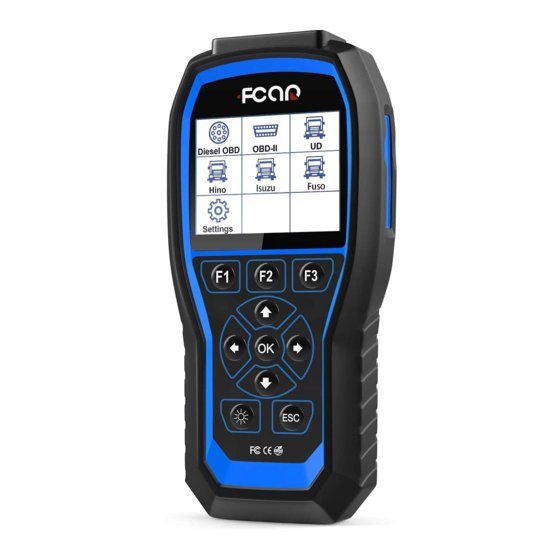
The FCAR F507 is a powerful and versatile diagnostic tool designed for professional technicians and fleet operators. This tool offers OEM-level diagnostics while working as a code reader. The scanner can support class 8 trucks, automatic search, and routine operations like reading and clearing fault codes, reading real-time data, freeze frames, graphics, and much more. Its comprehensive functionality allows users to perform deep diagnostics on multiple vehicle systems, from engine and transmission to ABS, airbag, and more.
Pros & Cons of Nexlink NL102 for John Deere Code Reading (2026 Update)
Pros
Full-system diagnostics: Provides access to all major vehicle systems, similar to OEM-level tools.
Supports Class 8 trucks: Ideal for heavy-duty trucks, such as Freightliner, Volvo, Kenworth, or Peterbilt.
Automatic system search: Quickly identifies available ECUs and streamlines the diagnostic process.
Comprehensive data display: Shows real-time sensor data, freeze frames, and graphical outputs for easier analysis.
User-friendly operation: Designed to simplify complex diagnostics, suitable for professional mechanics and fleet technicians.
Routine maintenance functions: Supports reading and clearing fault codes, performing basic service resets, and monitoring vehicle performance.
Cons
Higher cost: As an advanced professional tool, it is more expensive than basic code readers.
Learning curve: Fully utilizing all functions may require experience or training.
Limited software updates on non-Windows devices: Some updates or features may only be accessible through Windows PCs.
Heavy-duty focus: While excellent for Class 8 trucks, it may be overkill for light-duty vehicles or occasional use.
Explore User Reviews of FCAR F507 (2026 Update)
The following is recently posted reviews of the FCAR F507. These reviews are publicly-available and may be slightly altered to shorten the content or correct spelling and/or grammar mistakes.
User Reviews from Ebay
I was pleased with the item, as it matched its description and arrived promptly. The seller was great to work with. Their excellent communication, and quick delivery meant I didn't have any anxiety about this purchase. The item also came well packed which made it especially appealing. I am very happy with this seller and will definitely buy again if they have what I need. A+++++++
This item works as it should, appears to be of good quality, and came with a variety of connections. The user manual is very short. I would purchase this item again.
Please note that these reviews are based on personal experiences and opinions of individual users and do not necessarily represent the views of our website. We do not verify or guarantee the accuracy, completeness, or reliability of these statements, and individual results may vary depending on equipment, usage, and technical expertise.
TLDR: The FCAR F507 is a professional-grade diagnostic scanner that offers OEM-level diagnostics for heavy-duty and Class 8 trucks. It can read and clear fault codes, display live data and freeze frames, and run full-system diagnostics across multiple vehicle systems. While powerful and versatile, it is more expensive and has a learning curve, making it better suited for professional technicians and fleet maintenance rather than casual users.
Top John Deere Code Reader Comparison Table
| Feature | Jaltest | Nexlink NL102 | FCAR F507 |
|---|---|---|---|
| Diagnostic Coverage | Full system diagnostics for John Deere agricultural equipment | Basic engine diagnostics and fault code reading | Full system truck diagnostics with limited compatibility for John Deere |
| Fault Code Reading | Yes – full DTC scan across multiple control modules | Yes – reads engine fault codes | Yes – reads and clears fault codes |
| Fault Code Clearing | Yes | Yes | Yes |
| Live Data Monitoring | Yes – real-time data across multiple systems | Limited | Yes – includes graphs and live sensor data |
| Equipment Coverage | Tractors, combines, sprayers, and other John Deere agricultural equipment | Most John Deere models with engine diagnostics | Primarily Class 8 trucks with some diesel equipment support |
| Advanced Troubleshooting | Guided diagnostics and troubleshooting procedures | Basic fault code lookup | Basic diagnostic functions |
| Additional Diagnostic Functions | System tests, calibrations, and component diagnostics | Primarily fault code reading | Freeze frame data, graphics, and routine diagnostic functions |
| Multi-Industry Modules | Yes – CV, Off-Highway, Agriculture, and Marine modules available | No | Limited truck-focused support |
| Ease of Use | User-friendly interface with documentation | Simple handheld scanner | Moderate learning curve |
| Best For | Professional technicians and equipment repair shops | Quick code checks | Truck technicians needing OEM-level functions |
What is the Best John Deere Code Reader in 2026?
With an overview of the three best John Deere code readers, there’s only one question left to answer. What is the best John Deere code reader overall?
Our top-recommend choice for reading John Deere fault codes has to go to Jaltest AGV. Unlike basic code readers that only display fault codes, Jaltest AGV allows John Deere vehicle owners to read and clear codes, monitor live data, perform component activations, and carry out advanced service functions such as calibrations and forced regenerations.
At WholeFleet, we have sold Jaltest AGV kits to dozens of people across the U.S. and Canada. Our clients have reported a dramatic increase in time and cost-savings while help make up for the initial investment. Jaltest’s advanced OEM capabilities make it able to compete with and even replace brand-specific diagnostic softwares like INSITE for Cummins.
As an all-in-one tool, Jaltest offers a streamlined, affordable solution for multi-brand vehicle owners. Owners of Jaltest AGV benefit from fantastic coverage of John Deere makes and models, as well as comprehensive support for competing brands like Caterpillar and New Holland, enabling you to switch at any time.
In conclusion, each of the three John Deere code readers discussed in this article – Jaltest, Nexlink NL102 and FCAR 507 – offer unique features that can help you diagnose problems with your John Deere machinery. While all are excellent choices for a john deere code reader, Jaltest is our top choice overall as it offers comprehensive coverage on most john deere models, plus additional modules like CV and marine if you ever expand into different markets. Ultimately, which John Deere code reader is best for you will depend on what type of vehicle needs to be diagnosed and how much functionality you require from the product. With these considerations in mind, we hope that this article has helped make your decision-making process easier!