Jaltest Expert Mode Explained: Everything You Need to Know
As Canada’s top Jaltest distributor, we often get calls about using the Expert Mode available in the software. Jaltest’s Expert Mode, once enabled, will completely change what your shop is capable of with the software, with more advanced capabilities than the standard software offers.
Today, we’ll be introducing some of the basic features available in Jaltest’s Expert Mode, how to access it, and what all users should know before using it. Expert Mode is a powerful component of the Jaltest software, but it should only be used in specific scenarios that necessitate it. Keep reading to learn why and how to use it.
An Introduction to Jaltest Expert Mode and its Capabilities
Jaltest is a powerful diagnostic tool designed for multi-brand vehicle and equipment servicing.
Expert Mode is a special mode that can be enabled within Jaltest to provide advanced functionalities specifically designed for professional technicians. Jaltest recommends only using Expert Mode if you’re a professional.
Jaltest’s Expert Mode offers extensive features that expand the diagnostic experience and what you can do with the software. When used in the ideal scenario, it can make troubleshooting and repair more effective and resolve complex vehicle issues that go beyond Jaltest’s standard capabilities.
Considering Jaltest for your shop? Request a virtual demonstration of the software!
Expert Mode Features
In-Depth Diagnostics: Expert Mode allows technicians to access comprehensive diagnostic information beyond fault code reading. It enables live data monitoring and parameter monitoring, which helps with accurately diagnosing complex issues and seeing how the vehicle responds in real-time.
Advanced Functionality: With Expert Mode, technicians can perform advanced functions such as actuator tests, component calibrations, and DPF regenerations.
Configuration and Programming: Technicians can use Expert Mode for configuring and programming vehicle modules and components. This includes setting up new parts after installation, ensuring that they are integrated correctly into the vehicle's systems. Expert Mode makes the software capable of making permanent changes to the ECU and other related components, which is why it’s locked behind Expert Mode to prevent misuse.
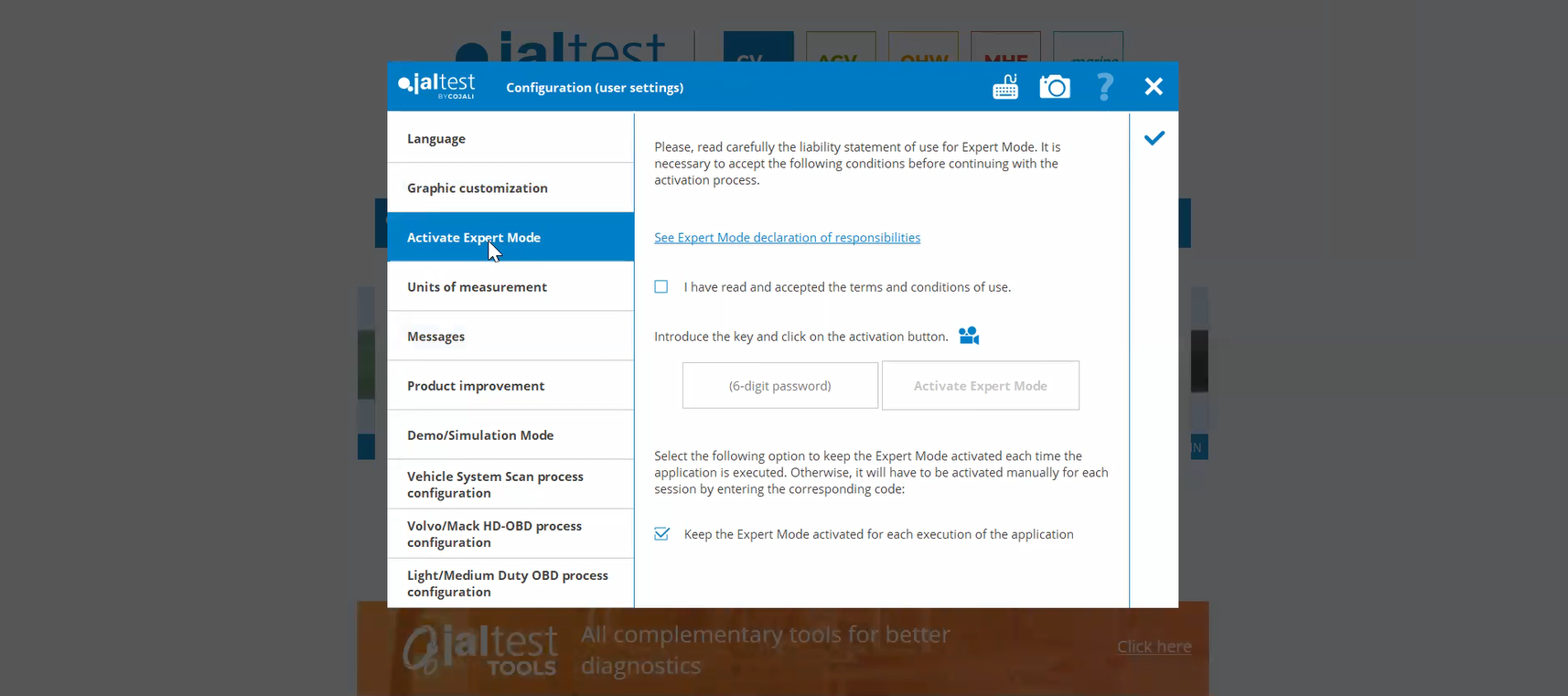
How to Access Jaltest Expert Mode in Version 25.2
Step 1: Setting Your Preferences
Starting on the Jaltest main menu, click on “Preferences” (the icon on the top right that looks like a bullet point list).
Step 2: Configuration
After clicking on “Preferences”, click “Configuration” on the menu that pops up. This is usually the first option on the menu and has a cog icon next to it.
Step 3: Activate Expert Mode
Below “Languages” and “Graphic Customization”, you should see a tab that says “Activate Expert Mode”
Click on the “Activate Expert Mode Tab and accept the Terms & Conditions. You should be prompted to enter a 6-digit expert mode code.
Your Expert Mode code should be provided to you by your Jaltest dealer after purchase. If you purchased Jaltest from WholeFleet Diagnostics, contact us for your Expert Mode code.
Enter your Expert Mode code and click the check mark to save your settings. You should see the word “Expert” in the lower left corner once activated.
Watch WholeFleet Diagnostics Founder Kevin Vieth Explain Jaltest’s Expert Mode
Please note that this recording was made when an earlier version of the Jaltest software was active (version 22.1). Several updates have been made to the platform since then, so expert your software to look different.
Jaltest Expert Mode: When & When Not to Use It
Risks of Using Expert Mode
While Jaltest Expert Mode offers advanced diagnostic capabilities, it’s important to be aware of the risks involved.
Making adjustments or changes to critical systems using Expert Mode could cause serious problems if not done correctly.
Misconfigurations can lead to performance problems or even vehicle failures.
Misinterpreting data can lead to an incorrect diagnosis, which may lead to ineffective and, in some cases, damaging repairs.
When to Use Jaltest Expert Mode
You are diagnosing persistent fault codes that do not clear. Deeper analysis of the issue is necessary.
You need to perform advanced functions such as system adaptations, component calibrations, or actuator tests that aren’t available in the basic mode.
You’re working on vehicles with multiple systems presenting symptoms. You need comprehensive data analysis that’s only available in Expert Mode to identify how each component is connected.
You need to configure new components or modules after repair or replacement, ensuring proper integration with the vehicle’s system.
When to Avoid Using Expert Mode
You are a non-technician or new technician who doesn’t have experience using Jaltest. In this case, we recommend working alongside a more experienced technician when using Expert Mode.
You are diagnosing basic maintenance issues or common problems that can easily be identified with standard fault codes. Expert Mode may complicate the process unnecessarily.
You’re unfamiliar with the specific vehicle systems involved.
Time is limited and only a quick diagnosis is needed.